Sometimes you want to kill the Rstudio server for certain reasons.
The browser-based RStudio session repeatedly froze, even after reopening it. Restarting the session or signing out did not help, and the visible environment was empty.
ps aux | grep rstudio
rstudio+    4559  0.2  0.0 10098692 211780 ?     Sl    2023 163:43 /opt/rstudio-pm/bin/rstudio-pm --config /etc/rstudio-pm/rstudio-pm.gcfg
rstudio+    4560  0.0  0.0   7312   536 ?        S     2023   0:00 tee -a /var/log/rstudio/rstudio-pm/rstudio-pm.log
rstudio+    5129  0.0  0.0 21036608 25260 ?      Sl    2023   3:27 /opt/rstudio-pm/ext/rstudio-launcher /var/lib/rstudio-pm/launcher_internal/localhost.localdomain/launcher.conf
rstudio+    5430  0.0  0.0 19073016 14492 ?      Sl    2023   3:47 /opt/rstudio-pm/ext/rstudio-local-launcher --server-user rstudio-pm --enable-debug-logging 0 --scratch-path /var/lib/rstudio-pm/launcher_internal/localhost.localdomain/Local --heartbeat-interval-seconds 5 --job-expiry-hours 24 --plugin-name Local --config-file /var/lib/rstudio-pm/launcher_internal/localhost.localdomain/launcher.local.conf --launcher-config-file /var/lib/rstudio-pm/launcher_internal/localhost.localdomain/launcher.conf
rstudio+    6021  0.0  0.0 351876 129384 ?       Ssl   2023   3:31 /usr/lib/rstudio-server/bin/rserver
root     1759740  0.0  0.0 351876 87724 ?        S    Jan10   0:00 /usr/lib/rstudio-server/bin/rserver
root     1787130  0.0  0.0 351876 95968 ?        S    Jan11   0:00 /usr/lib/rstudio-server/bin/rserver
jordan   1883199 21.0  0.0 18036132 837736 ?     Sl   14:45   0:31 /usr/lib/rstudio-server/bin/rsession -u jordan --session-use-secure-cookies 0 --session-root-path / --session-same-site 0 --launcher-token A0076E0C
jordan   1883380  0.0  0.0  12136  1052 pts/0    S+   14:47   0:00 grep --color=auto --exclude-dir=.bzr --exclude-dir=CVS --exclude-dir=.git --exclude-dir=.hg --exclude-dir=.svn rstudio
root     3071258  0.0  0.0 351532   208 ?        S     2023   0:00 /usr/lib/rstudio-server/bin/rserver
root     3290658  0.0  0.0 339316   196 ?        S     2023   0:00 /usr/lib/rstudio-server/bin/rserver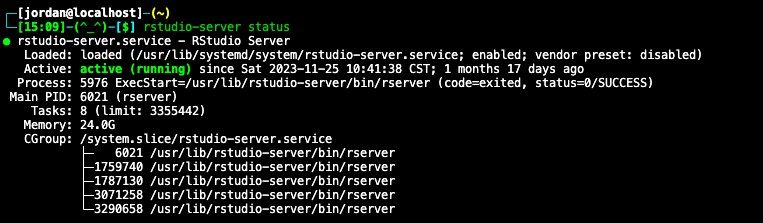
→ sudo kill <PID> (Do not terminate the main server process; that would interrupt the whole service.)
The investigation also considered session state under ~/.local/share/rstudio/sessions/active/.
✅ Solved:
The cause was an R Markdown chunk producing excessive output. Renaming or rebuilding the affected Rmd resolved this incident.