Project Overview
I developed and deployed a client-facing web application for collecting and managing order details. The application was hosted on a Synology NAS located behind a firewall, while still needing to be accessible to external users through the internet. Because the NAS environment had several infrastructure limitations, including restricted port access and disabled Synology home directories, I designed a custom deployment and development workflow using Docker, Docker Compose, reverse proxy, SSH tunneling, and GitHub as a relay between local development and NAS deployment.
Goals / Challenges
- Portable and easy-to-transfer architecture
The project needed to be easy to migrate, redeploy, and maintain across environments. - Secure order data handling
The website was designed to receive order details from clients, so data storage, data safety, and controlled access were important requirements. - External access from behind a firewall
The entire application was hosted on a Synology NAS inside a firewall. Although the NAS was not directly exposed to the internet, users still needed to access the service externally. - Restricted developer access to NAS ports
Since the NAS service ports were not directly accessible from the developer’s local machine, SSH tunneling was required to inspect and test internal services. - Limited remote development capability
The Synology/homefeature was disabled, which prevented direct remote development through IDEs such as VSCode Remote SSH. - Production and staging separation
The project required separate production and staging environments to improve stability and reduce deployment risk.
Results / Solutions
-
Containerized the entire web application using Docker and Docker Compose
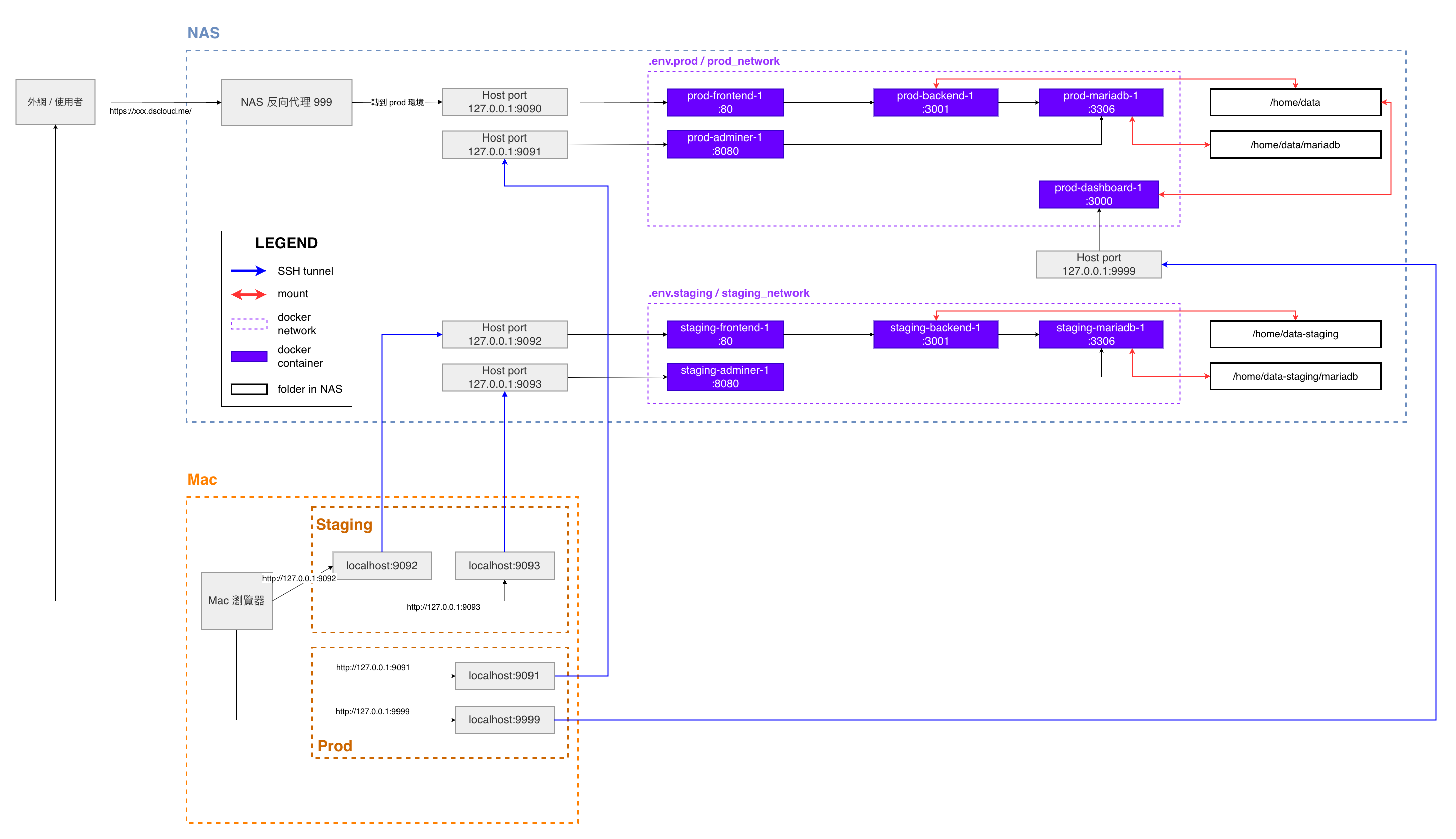
The frontend, backend, database, admin interface, and dashboard services were organized as Docker containers with isolated Docker networks. This made the system easier to transfer, redeploy, and maintain. -
Built separate production and staging environments
Production and staging services were managed with separate Docker Compose configurations, environment files, ports, networks, and mounted storage paths. This allowed safer testing before production deployment. -
Stored persistent data in MariaDB mounted on NAS storage
MariaDB data was mounted to NAS directories to ensure persistence, easier backup, and safer long-term data storage. -
Exposed only the frontend through reverse proxy
External users accessed the website through the NAS reverse proxy, while backend, database, admin, and dashboard services remained protected from direct public access. -
Used SSH tunnels for developer-side service inspection
Developers accessed internal NAS ports through SSH tunnels, allowing local browser access to production and staging interfaces without exposing those ports publicly. -
Designed a GitHub-based development workflow
Since the NAS could not be used comfortably as a direct remote development environment, I used GitHub as a relay station: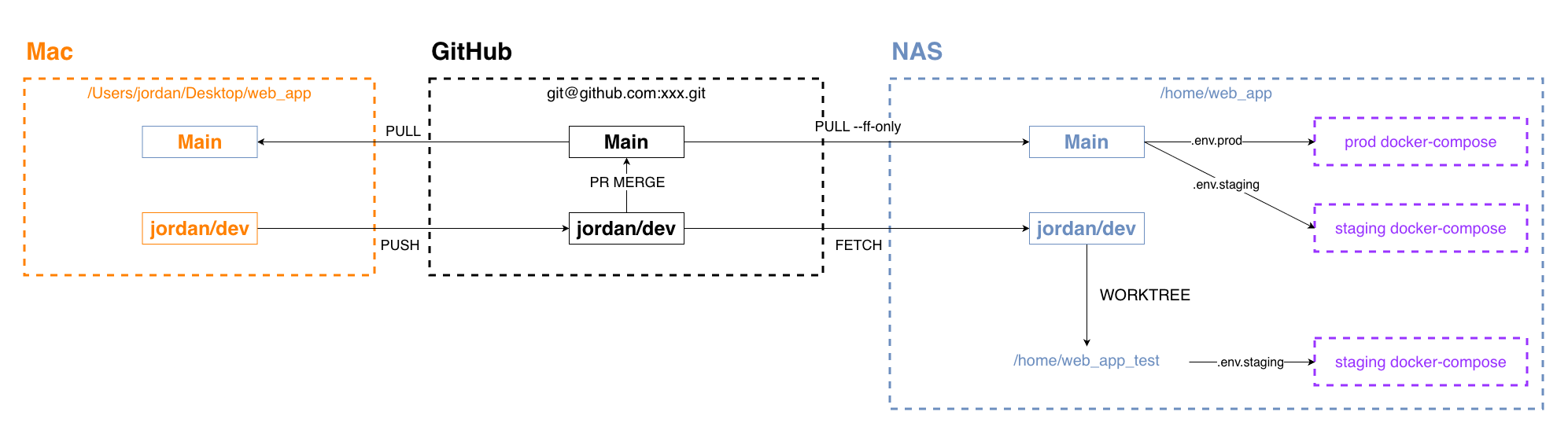
Local development, GitHub relay, and NAS deployment workflow - develop locally on my Mac
- push changes to GitHub
- pull updates on NAS
- deploy using Docker Compose
Highlights